Regions & Frequency Plans
Overview
Every LoRaWAN® network runs on a regional frequency plan, such as EU868 or US915. In TEKTELIC KONA Core Network Server, a gateway takes its frequency plan from its gateway model. Your gateways and devices must use the same plan, or KONA Core never receives the device's uplinks.
How it works
What a frequency plan is
The LoRa Alliance® publishes the LoRaWAN Regional Parameters. For each region, they define a frequency plan:
- the frequency band and the radio channels a device may use
- the data rates and the maximum transmit power
- the frequency and data rate of the second receive window (RX2), used for downlinks
- regional limits, such as duty cycle in EU868 or dwell time in AS923 and AU915
A LoRa® device, a gateway and the network server all follow the same plan. The radio hardware and firmware of a gateway or device are built for a plan. That is why TEKTELIC offers each KONA gateway type in several regional versions.
The frequency plan isn't the same as the hosting region of KONA Core. TEKTELIC hosts KONA Core in an EU and an NA region, and the hosting region only decides which server your gateways connect to. See What is KONA Core Network Server.
Frequency plans in KONA Core
A gateway model has one frequency plan. KONA Core gateway models support these values:
| Value in the API | Regional plan | Example TEKTELIC gateway model |
|---|---|---|
EU_863_870 | EU868 | Kona Micro EU GW |
US_902_928 | US915 | Kona Micro US GW |
AU_915_928 | AU915 | Kona Micro AU GW |
AS_923_1 | AS923-1 | Kona Micro AS923-1 GW |
AS_923_2 | AS923-2 | Kona Micro AS923-2 GW |
AS_923_3 | AS923-3 | Kona Micro AS923-3 GW |
AS_923_4 | AS923-4 | Kona Micro AS923-4 GW |
AS_920_923 | AS923, 920–923 MHz | Kona Enterprise AS GW (AS920-923) |
AS_923_925 | AS923, 923–925 MHz | Kona Enterprise AS GW (AS923-925) |
CN_470_510 | CN470 | Kona Micro CN GW |
IN_865_867 | IN865 | Kona Micro IN GW |
KR_920_923 | KR920 | Kona Micro KR GW |
RU_864_870 | RU864 | Kona Micro RU GW |
ISR_915_917 | Israel, 915–917 MHz | Kona Micro ISR GW |
KONA Core has no gateway model value for other regional plans, such as EU433 or CN779. The values come from the Swagger spec, and the example models from the EU hosted service. Both EU and NA hosting support the plans above. The hosting region doesn't restrict the gateway's frequency plan.
TEKTELIC provides gateway models for most combinations of KONA gateway type and plan. The types are Kona Micro, Kona Micro Lite, Kona Macro, Kona Mega, Kona Mega EX, Kona Enterprise and Kona Photon. The model name shows the plan, such as EU or AS923-1. A Provider selects the band from the Frequency band dropdown when creating a gateway model. See Manage Gateway Models.
Where the frequency plan is set
| Entity | Frequency plan | Who sets it |
|---|---|---|
| Gateway model | Set in the model. | A Provider. A Customer can't open the gateway models page. See Manage Gateway Models. |
| Gateway | Taken from the Gateway model you select when you add the gateway. | A Provider or Customer administrator. |
| Device model | Not set. A device model holds the Manufacturer, Name, Type, Device class and Description. See Manage Device Models. | None. |
| Device | Not set in KONA Core. The plan is built into the device hardware and firmware. | The device manufacturer. |
The rfRegion value in uplink metadata comes from the receiving gateway with the strongest signal. See Message Formats.
The gateway details panel shows the Gateway model and the radio data of the model, such as Frequency band and Channels. The Frequency band is set when the gateway model is created; the gateway takes this value from its model.
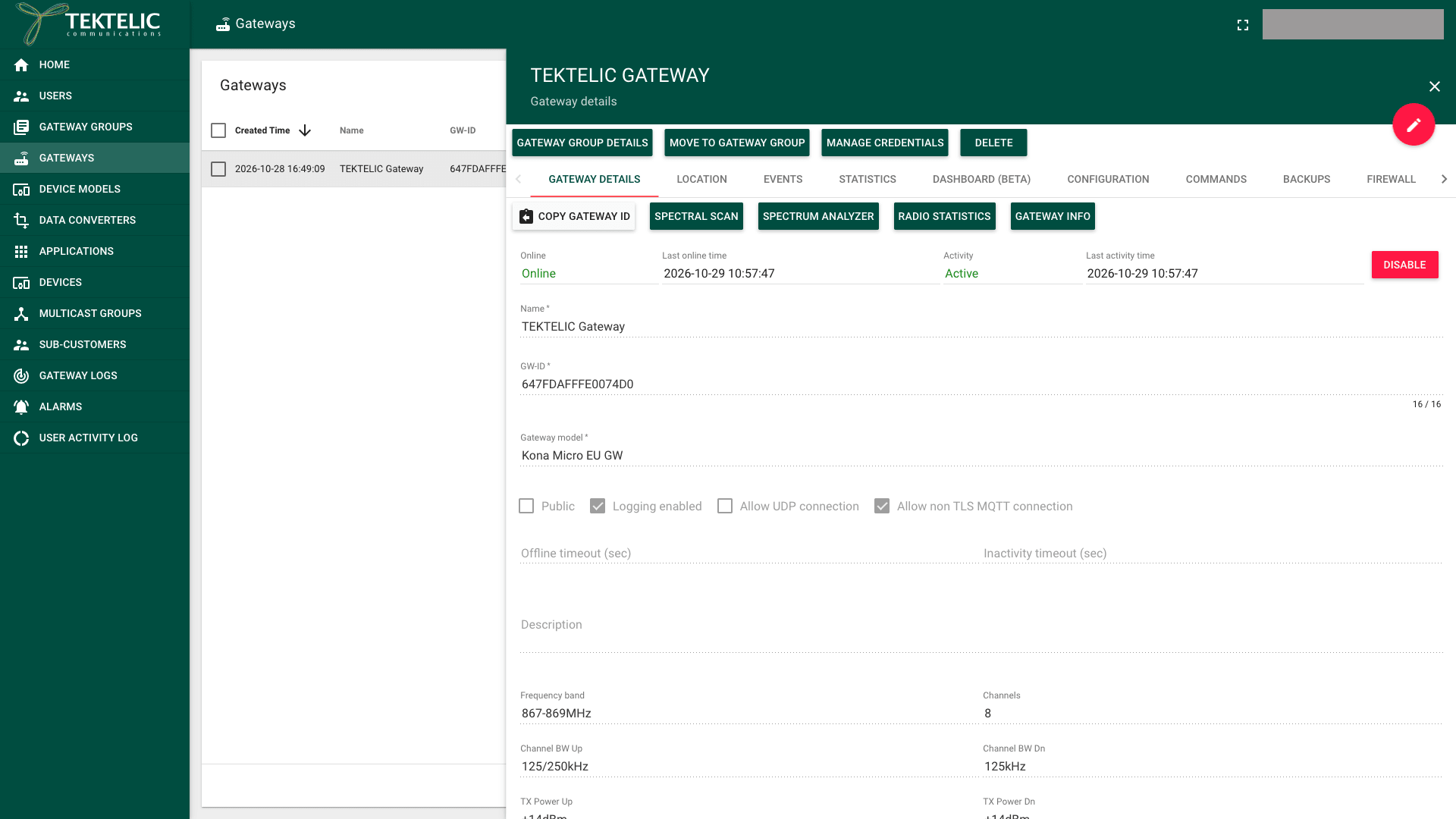
Some network settings depend on the plan. For example, the UI marks the Channel frequency list (MHz) as not applicable to US, AUS and CN regions. The TxParamSetupReq configuration is supported only in AS923 and AU915.
Why gateway and device plans must match
A gateway listens only on the channels of its frequency plan. A device sends only on the channels of its own plan. If the plans differ, the gateway doesn't hear the device. KONA Core then receives no uplinks and no join requests from it.
Downlinks fail in the same way. KONA Core answers in the receive windows of the plan, on frequencies the device must listen on.
Even when the plans match, the channels must overlap. US915 and AU915 define 64 uplink channels of 125 kHz, while a gateway with 8 channels listens on only 8 of them. The device must use the same group of channels as the gateway.
The device uses a channel mask for this, often one sub-band of 8 channels. In KONA Core, the Default channel mask network setting offers 64-channel, 8-channel and Custom channel mask. For North American devices, Default channel mask controls the channels requested through LinkADRReq. AU915 also defines channel masks through LinkADRReq in the LoRaWAN Regional Parameters. See Network Settings.
We recommend ordering TEKTELIC devices and KONA gateways for the same plan, and selecting the gateway model of exactly that plan. A plan mismatch is one reason why a device never joins. If a device stays offline after onboarding, compare its plan with the plan in the name of the gateway model.
KONA Core raises the INVALID_UL_FREQUENCY event when an uplink frequency isn't valid for the device. See Alarms & Events Reference.
Recommended channel settings
Set the channels of your plan on the Advanced network settings tab of the application. A device with Use application settings cleared needs the same values on its own tab. The values match the default channels of TEKTELIC gateways.
| Code on the gateway barcode | Regional plan | Setting |
|---|---|---|
| EU | EU868 | In Channel frequency list (MHz), add 867.1, 867.3, 867.5, 867.7, 867.9. |
| NA | US915 | Set Default channel mask to 8-channel. |
| AU | AU915 | Set Default channel mask to 8-channel. |
| A1 | AS923-1 | In Channel frequency list (MHz), add 922.0, 922.2, 922.4, 922.6, 922.8, 923.0. |
| A2 | AS923-2 | In Channel frequency list (MHz), add 921.0, 921.2, 921.8, 922.0, 922.2, 922.4. |
| A3 | AS923-3 | In Channel frequency list (MHz), add 916.2, 916.4, 917.0, 917.2, 917.4, 917.6. |
| A4 | AS923-4 | In Channel frequency list (MHz), add 916.9, 917.1, 917.7, 917.9, 918.1, 918.3. |
| KR | KR920 | In Channel frequency list (MHz), add 921.9, 922.7, 922.9, 923.1, 923.3. |
| IN | IN865 | In Channel frequency list (MHz), add 865.6025, 865.7850, 866.3000, 866.5000, 866.7000. |
| RU | RU864 | In Channel frequency list (MHz), add 866.1, 866.3, 866.5, 866.7, 866.9. |
| CN | CN779 | Not supported. |
| DN | — | Not supported. |
the gateway model values in Swagger include AS923-4 and RU864, the TEKTELIC default-settings table marks both as absent in the production database (contributing/open-questions.md).
You are responsible for compliance with local radio regulations, including duty cycle and dwell time.
Related
- Network Settings
- Manage Gateway Models
- Manage Device Models
- Onboard a KONA Gateway via MQTT
- Onboard a TEKTELIC Device
- What is KONA Core Network Server
- Glossary
- API: Save gateway model sets the frequency plan of a gateway model.