Users, Roles & Permissions
Overview
Every TEKTELIC KONA Core Network Server user has one role. The role sets the tenant level the user belongs to and whether the user can change things or only view them. Knowing the roles helps you give each person the access they need, and no more.
How it works
Levels and roles
KONA Core has four tenant levels: System, Provider, Customer and Sub-Customer. Each level has two roles: an administrator role and a user role.
| Level | Administrator role | User role | Notes |
|---|---|---|---|
| System | System administrator | System user | The System level creates Providers. On the TEKTELIC-hosted service, TEKTELIC manages it. On premises, your organization can use it. |
| Provider | Provider administrator | Provider user | Network operator that manages Customers and gateways. |
| Customer | Customer administrator | Customer user | Organization that runs applications and devices, and manages its Sub-Customers. |
| Sub-Customer | Sub-Customer administrator | Sub-Customer user | Organization managed by a Customer. |
Your role is shown at the top right of every page, next to the account icon.
Access depends on the user's role, tenant and enabled modules:
- An administrator role can add, edit and delete entities on those pages.
- A user role can only view them. Details panels open read-only, and the add and delete buttons are hidden. User roles can't run gateway commands.
We recommend the user role for anyone who only monitors the network, for example a support or operations team. Give the administrator role only to the people who change the setup.
What each role can open
The table shows pages and features at each administrator's own tenant level, with both NS and OAM access. Access to a Provider's Customers is described below. User roles can only view the pages available to them. The Modules setting can further restrict the features listed here.
| Page or feature | System administrator | Provider administrator | Customer administrator | Sub-Customer administrator |
|---|---|---|---|---|
| Users | Yes | Yes | Yes | Yes |
| Customers, Subscription Plans (page title Customer Subscription Plans) | No | Yes | No | No |
| Gateway models | No | Yes | No | No |
| Gateway groups, Gateways, Gateway logs | No | Yes | Yes | No |
| Alarms | No | Yes | Yes | Yes |
| Sub-Customers | No | No | Yes | No |
| Device models, Data converters | No | No | Yes | Yes |
| Applications, Devices | No | No | Yes | Yes |
| Integrations, inside an application | No | No | Yes | Yes |
| Multicast Groups | No | No | Yes | Yes |
| User Activity Log | Yes | Yes | Yes | Yes |
A Sub-Customer administrator can manage users, applications, devices, device models, data converters and integrations within its access scope. Administrator rights don't grant access to entities outside the role's scope. For example, a Customer can't manage gateway models created by its Provider.
A Sub-Customer has no gateway pages. If a menu item you expect is missing, check both your role and modules. Ask your administrator to review your access.
Who manages which users
An administrator manages users within its tenant permissions. A Provider can also open the users of Sub-Customers under its own Customers. The table lists the roles each administrator can assign.
| Your role | Roles you can assign |
|---|---|
| System administrator | System administrator, System user, Provider administrator, Provider user |
| Provider administrator | Provider administrator, Provider user, Customer administrator, Customer user |
| Customer administrator | Customer administrator, Customer user, Sub-Customer administrator, Sub-Customer user |
| Sub-Customer administrator | Sub-Customer administrator, Sub-Customer user |
When you assign a role of the level below, the Add User dialog also asks which organization the user belongs to. For a Sub-Customer role, for example, the Sub-Customer field appears.
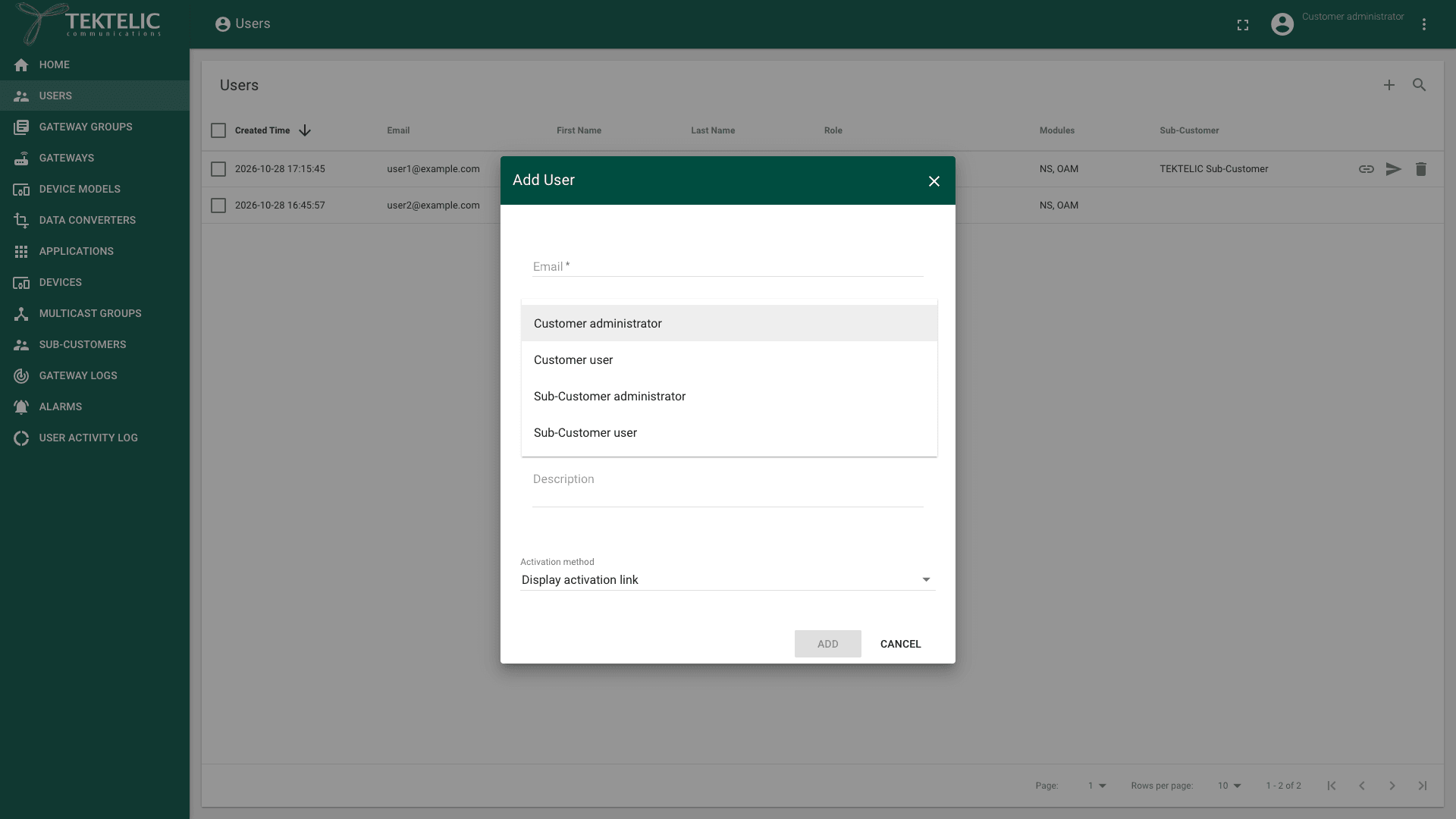
A few rules apply to every administrator:
- You can't delete your own user, and your own row opens read-only on the Users page.
- When you edit an existing user, you can change the role only to another role of the same level. To move a person to another level, add a new user there.
- Permanently disable blocks a user from signing in. You can't enable that user again.
- The user role of each level sees the Users page read-only. It can't add, edit or delete users.
Module access
The Users table has a Modules column:
- NS and OAM together enable both feature sets, within the user's role and tenant permissions.
- OAM alone excludes applications, devices, integrations, data converters and device models. Other features remain available within the user's role and tenant permissions.
If your account doesn't include a module you need, contact your administrator or TEKTELIC Support.
For the steps to add, activate and remove users, see Manage Users. To manage users from your own system, use Save user in the API Reference.
How access passes down the hierarchy
Access passes from a level to the level directly below it, never upward. Each level sees what it owns, and what the level above assigns to it.
- System: is the tenant level above Providers. These guides cover Provider, Customer and Sub-Customer tasks.
- Provider: creates Customers and assigns gateway groups to them. It opens each Customer's users and gateway groups from Customers. When a Provider unassigns a gateway or gateway group, the Customer can no longer access it.
- Customer: creates Sub-Customers and assigns applications to them. Only a Customer administrator can assign an application. From Sub-Customers, the Customer opens each Sub-Customer's users, applications, devices, integrations and multicast groups. When a Customer unassigns an application, the Sub-Customer can no longer access it.
- Sub-Customer: sees its own applications and devices, and applications assigned by its Customer. A Sub-Customer administrator can add applications, devices, device models, data converters and integrations.
A role at one level has no access to the data of other organizations at the same level. A Customer can't see another Customer's applications, for example. A Provider can open users of its Customers and their Sub-Customers. It can't open the applications or devices of those Sub-Customers.
For how the levels relate and what each one owns, see Tenancy Model. For how to assign gateway groups and applications, see Manage Customers & Sub-Customers.
Related
- Tenancy Model: the System, Provider, Customer and Sub-Customer levels, and what each one owns.
- Manage Users: add users, assign roles, resend activation and remove users.
- Accounts & Trial Access: get an account and sign in for the first time.
- Manage Customers & Sub-Customers: create organizations and assign gateway groups and applications.
- User Activity Log: see which user changed what.
- Security & Keys: who can see device keys and gateway credentials.
- To list users from your own system, use Get customer and sub customer users in the API Reference.