Subscription Plans & Limits
Overview
A subscription plan sets how many resources an organization can create in TEKTELIC KONA Core Network Server. It caps the number of gateways, Customers or Sub-Customers, applications, devices and integrations. Check your limits before you plan a LoRaWAN® network rollout.
This article doesn't cover prices. For prices, contact your Provider or Sales representative.
How it works
Two plan types
KONA Core has two plan types, one for Providers and one for Customers. For the tenant levels, see Tenancy Model.
| Plan | Assigned to | Assigned by | Limits |
|---|---|---|---|
| Provider Subscription Plan | Each Provider | System administrator | The Provider and all Customers under it |
| Customer Subscription Plan | Each Customer | The Customer's Provider | The Customer |
Every Provider must have a Provider Subscription Plan. Every Customer must have a Customer Subscription Plan.
Contact a TEKTELIC Sales representative to discuss your Provider Subscription Plan.
Sub-Customers don't have a plan of their own: the Sub-Customer details show no subscription plan field. All resources created by Sub-Customers count against their Customer's plan.
For who can view and manage plans, see Users, Roles & Permissions.
What a plan includes
A plan has a Name and a set of maximums. Each maximum takes a number, or you turn on Unlimited next to it. Name and Pricing/month, $ are required. Each maximum needs a number of at least 1, unless Unlimited is on.
| Parameter | Provider Subscription Plan | Customer Subscription Plan |
|---|---|---|
| Amount of maximum allowed gateways | Gateways allocated within the Provider hierarchy | Gateways available to the Customer |
| Amount of maximum allowed customers | Customers created under the Provider | Not in this plan |
| Amount of maximum allowed Sub-Customers | Not in this plan | Sub-Customers created under the Customer |
| Amount of maximum allowed applications | Applications created within the Provider hierarchy | Applications available to the Customer |
| Amount of maximum allowed devices | Devices created within the Provider hierarchy | Devices available to the Customer |
| Amount of maximum allowed integrations | Integrations created within the Provider hierarchy | Integrations available to the Customer |
The table uses the field labels shown in the Provider and Customer Subscription Plan forms.
A plan also has price and support fields: Pricing/month, $, Ticket Support, Tech Support and Renewal price.
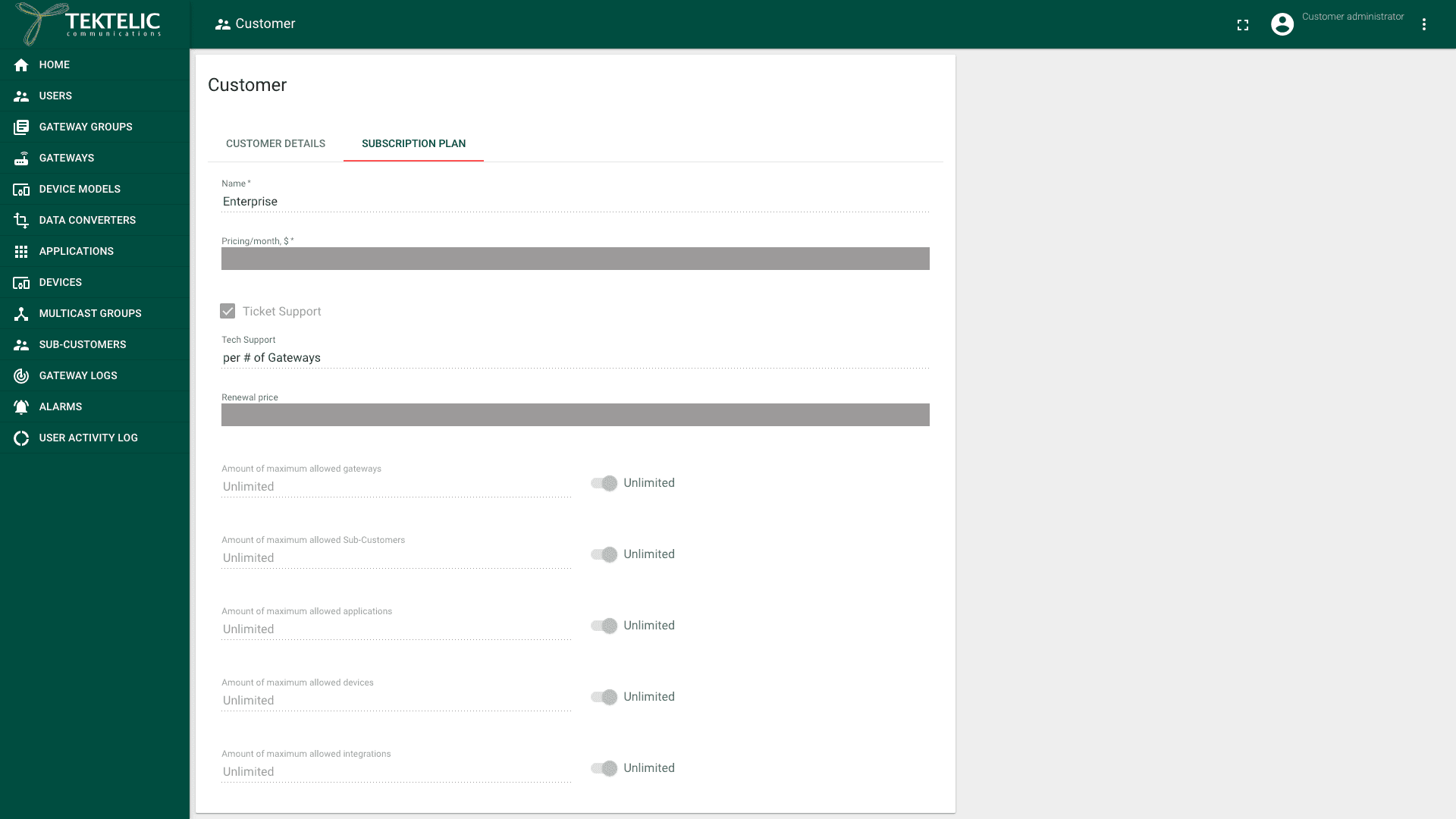
The Provider administrator sets the limits in each Customer Subscription Plan. Contact your TEKTELIC Sales representative to agree on your Provider plan and limits.
To manage plans from your own system, use Save customer subscription in the API Reference.
View your plan and usage
A Customer administrator can see the Customer's plan and current usage:
- In the top bar, select the three-dot menu next to your role.
- Select Customer details. The Customer page opens on the Customer details tab.
The tab shows the Subscription Plan name and its Since date. It also shows Number of Sub-Customers, Number of gateways and Number of devices. Each count shows used out of maximum, for example "1 out of Unlimited".
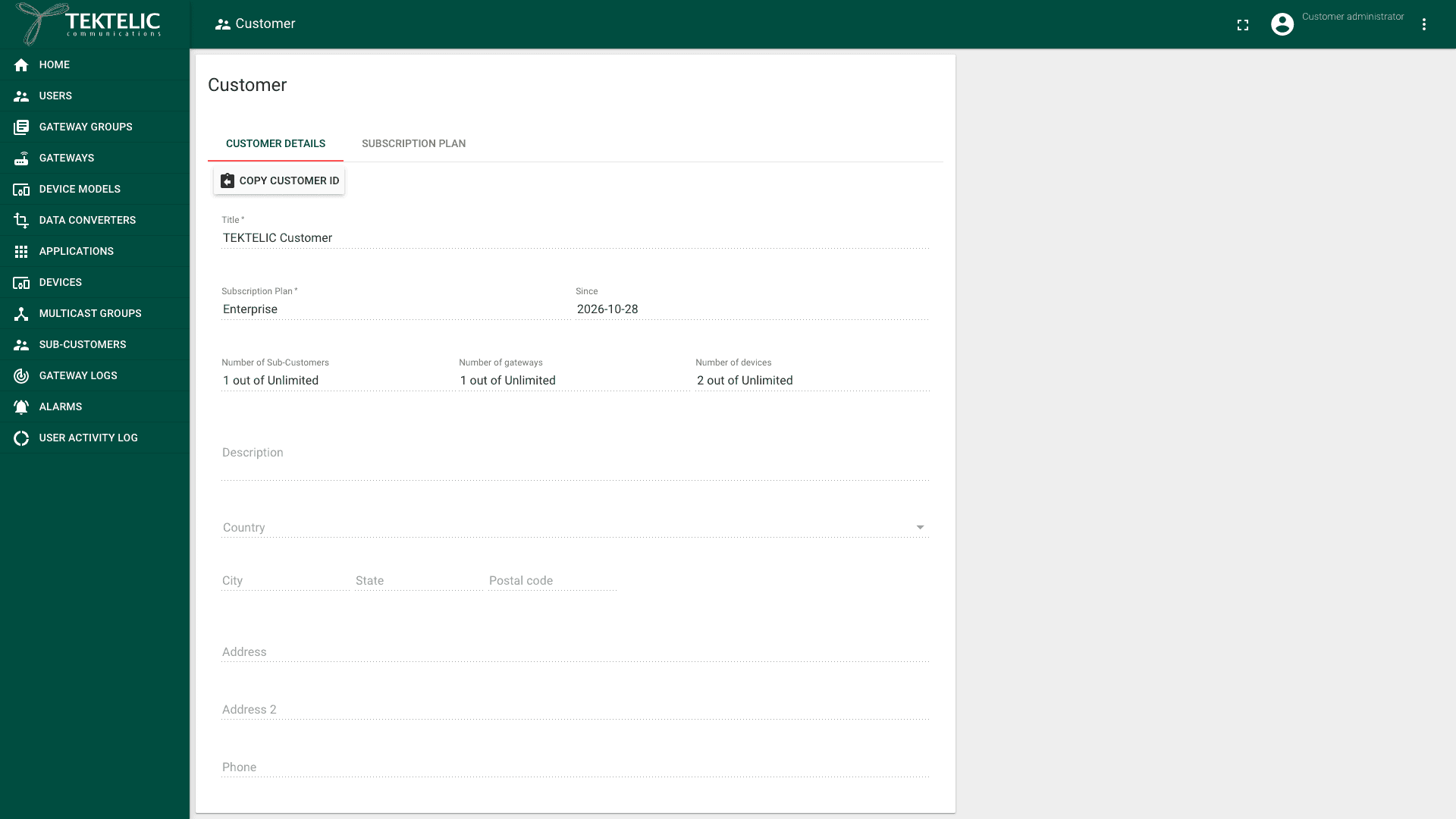
To see all of the plan's maximums, select the Subscription Plan tab. You can't change the maximums there.
Messages and users
The plan parameters cover only the resource types above. They don't include uplinks, downlinks or users. KONA Core has no additional per-account limits on messages or users outside subscription plans.
To check usage over time, see Usage Statistics & Reports.
How limits add up in the hierarchy
KONA Core enforces limits across the whole Provider hierarchy. The total that a Provider assigns to all its Customers can't exceed the Provider Subscription Plan.
For example, a Provider plan allows 20 gateways. The Provider splits them across three Customers:
| Customer | Gateways in the Customer plan |
|---|---|
| Customer A | 10 |
| Customer B | 5 |
| Customer C | 5 |
| Total | 20 |
No Customer can get more gateways until the Provider lowers another allocation or gets a larger plan. The same rule applies to Customers and Sub-Customers, applications, devices and integrations.
Keep a reserve in the Provider plan. Assign each Customer only what it needs now, and raise the Customer's plan when it grows.
When a limit is reached
When a count reaches its maximum, KONA Core rejects the request that would exceed it. For example, adding a gateway fails when the Customer already has the maximum number of gateways. Existing resources continue working. You can still add resources of other types if their limits allow it.
For a Customer plan limited to 1 gateway, the Subscription violation dialog shows:
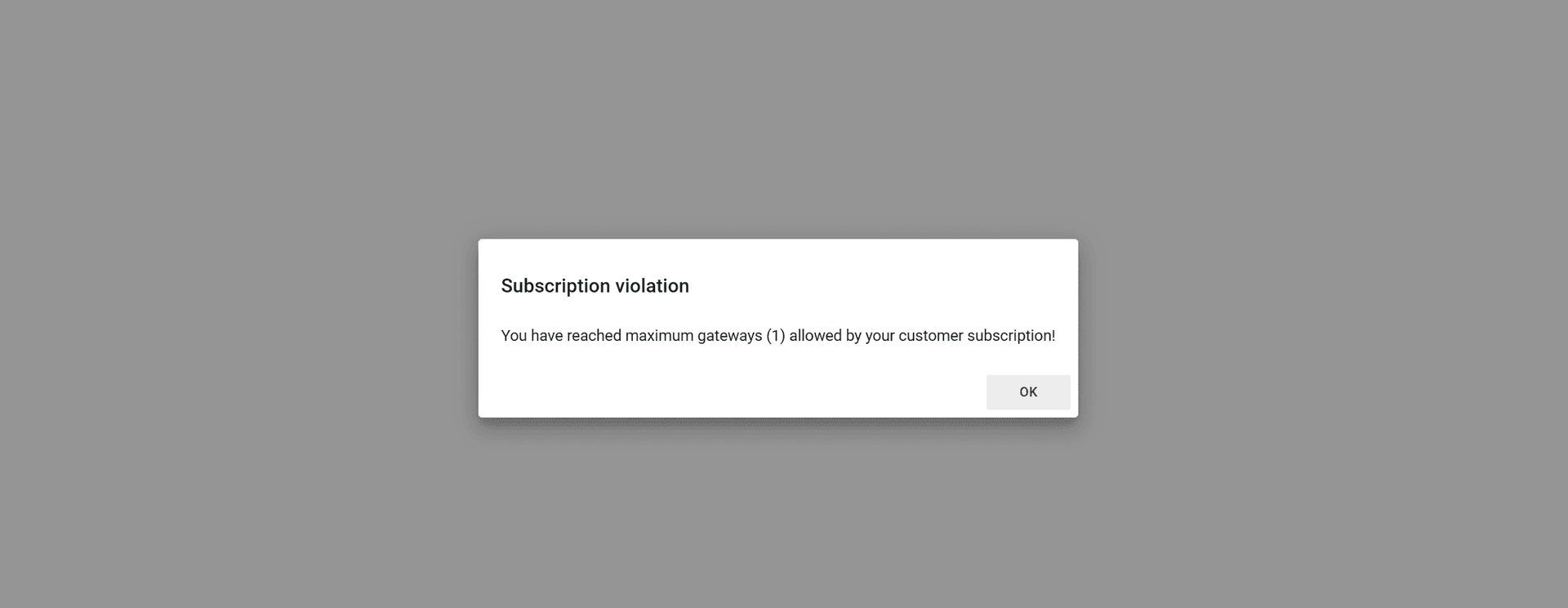
Select OK to close the dialog.
For the same limit, the API returns HTTP status 403 with a body like this:
{
  "message": "Maximum allowed customer gateways limit reached!",
  "errorCode": 40,
  "subscriptionErrorCode": "LIMIT_REACHED",
  "subscriptionEntry": "MAX_CUSTOMER_GATEWAYS",
  "subscriptionValue": 1
}
| Field | Meaning |
|---|---|
subscriptionEntry | The limit that was reached |
subscriptionValue | The limit in the plan, here 1 gateway |
See Save gateway in the API Reference.
To continue, remove resources you no longer need, or ask for a larger plan:
- A Sub-Customer asks its Customer.
- A Customer asks its Provider, which manages Customer Subscription Plans.
- A Provider contacts a TEKTELIC Sales representative about changing its plan.
Change a plan
The Provider administrator changes or reassigns a Customer's plan. For those steps and the remaining downgrade questions, see Manage Subscriptions.
Trial accounts
Trial accounts use the Trial subscription plan. The Subscription Plan tab shows these values:
| UI field | Trial plan value |
|---|---|
| Name | Trial |
| Amount of maximum allowed gateways | 10 |
| Amount of maximum allowed Sub-Customers | 1 |
| Amount of maximum allowed applications | 10 |
| Amount of maximum allowed devices | 10 |
| Amount of maximum allowed integrations | 10 |
For how to create a trial account and sign in, see Accounts & Trial Access.