Onboard a Third-Party Gateway via UDP
Overview
Connect a third-party LoRaWAN® gateway to TEKTELIC KONA Core Network Server with the Semtech UDP packet forwarder. You add the gateway by its GW-ID, allow UDP for it, and point its packet forwarder to KONA Core. At the end, KONA Core receives your devices' uplinks through the gateway.
We recommend MQTT whenever the gateway supports it. For KONA gateways, see Onboard a KONA Gateway via MQTT.
Before you start
- Role: Customer administrator or Provider administrator. A Sub-Customer can't add gateways. See Users, Roles & Permissions.
- Subscription plan: room for one more gateway. See Subscription Plans & Limits.
- Gateway group: the group the gateway joins. See Manage Gateway Groups.
- Gateway model: a gateway model for your gateway, with its manufacturer and frequency plan, for example EU868 or US915. A Provider creates gateway models. See Manage Gateway Models.
- Gateway EUI: the gateway's 64-bit ID, as 16 hexadecimal characters. The manufacturer prints it on the gateway or shows it in the gateway's web interface. KONA Core calls it GW-ID.
- Packet forwarder: the Semtech UDP packet forwarder installed on the gateway, and access to its configuration. See the gateway manufacturer's documentation.
- Network access: the gateway can send traffic to UDP port 1700 on its region's KONA Core host and receive replies. See the host table in step 2.
Steps
Limitations of UDP
A UDP gateway forwards radio packets only. Compare it with an MQTT gateway before you choose:
| MQTT (KONA gateways) | UDP (third-party gateways) | |
|---|---|---|
| Encryption | TLS by default | No TLS. Uplinks and downlinks travel unencrypted between gateway and KONA Core. |
| Sign-in | Username and password in Manage credentials | No sign-in or credentials. |
| Gateway commands, configuration and firmware upgrades | Yes | No. See Gateway Commands & Management. |
| Status columns | Online tracks MQTT keep-alive pings; Activity tracks data within the inactivity timeout | Online tracks statistics reports; Activity tracks data within the inactivity timeout. A UDP gateway can show both Online and Active. |
| Gateway events and statistics | Yes, including MQTT events | The same events and statistics, except MQTT-specific events. |
LoRaWAN payloads stay encrypted with the device's session keys on both paths. See Security & Keys.
Step 1. Add the gateway in KONA Core
-
In the side menu, select Gateway groups. The Gateway groups page opens.
-
In your group's row, select the Manage gateways icon. The group's gateways page opens, titled with the group name and Gateways.
-
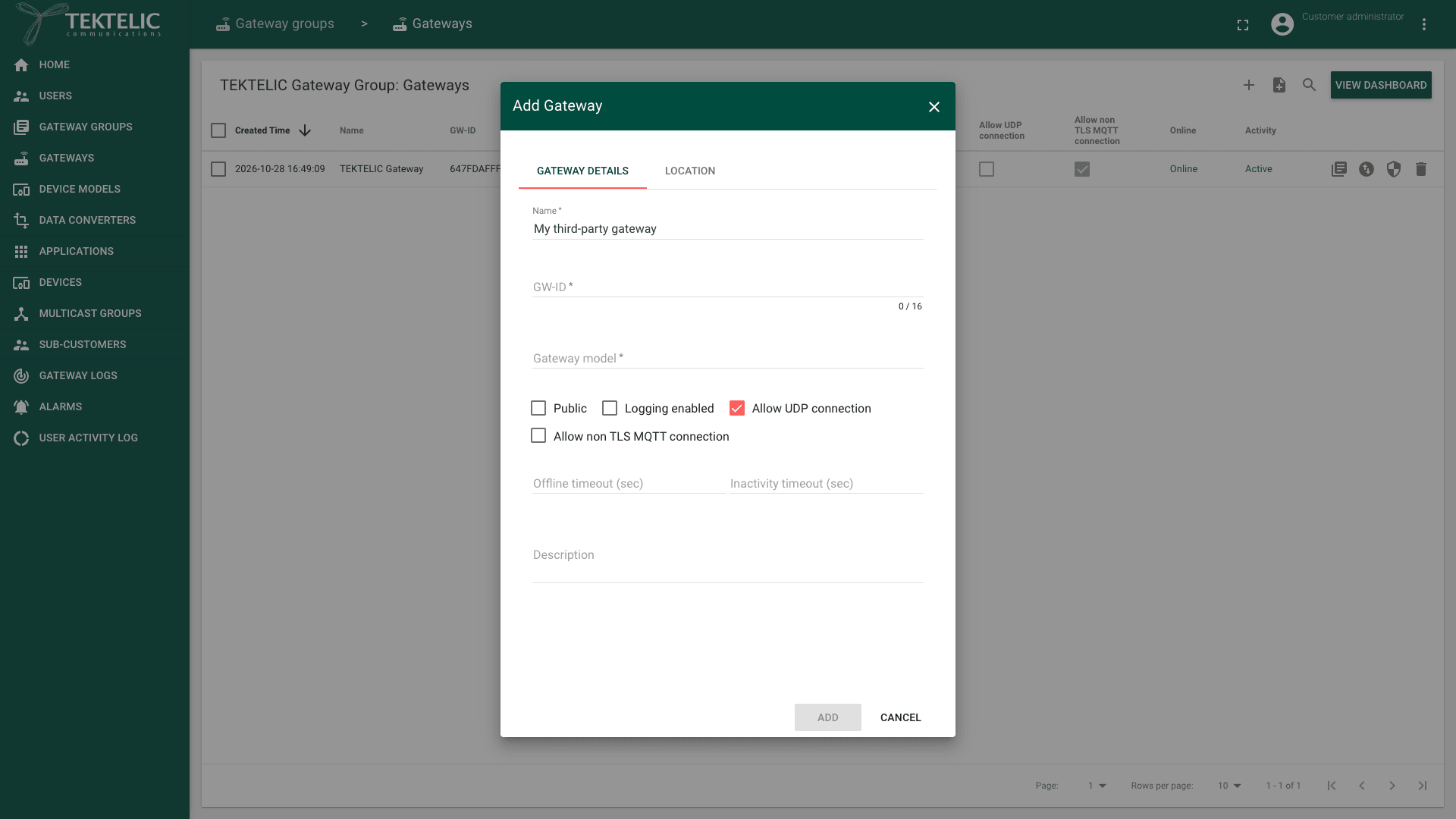
Select Add Gateway (the + icon). The Add Gateway dialog opens.
-
Enter a Name. The name is required.
-
Enter the Gateway EUI in GW-ID. It must be 16 hexadecimal characters. Otherwise the dialog shows KONA Core matches UDP packets to this GW-ID, so enter exactly the ID sent by the packet forwarder.
-
Select the Gateway model of your gateway.
-
Select Allow UDP connection. Without it, KONA Core doesn't accept the gateway's UDP traffic.
-
Leave Allow non TLS MQTT connection cleared. A UDP gateway doesn't use MQTT.
-
Select Logging enabled if you want to see this gateway's messages in Gateway logs. See Gateway Logs.
-
Optional: enter a Description, and on the Location tab enter the gateway's position.
-
Select Add. The gateway appears in the group's gateway list, with a check mark in Allow UDP connection.
The other fields are described in Onboard a KONA Gateway via MQTT. You don't need Manage credentials for a UDP gateway.
Step 2. Point the packet forwarder to KONA Core
Change the packet forwarder configuration on the gateway. The file and field names depend on the gateway manufacturer: see its documentation.
| Setting | Value |
|---|---|
| Gateway ID | The same Gateway EUI as GW-ID in KONA Core. |
| Server address | The KONA Core UDP host of your region. |
| Uplink port | 1700 |
| Downlink port | 1700 |
| Region | UDP host | Port |
|---|---|---|
| EU | lorawan-ns-eu.tektelic.com | 1700 |
| NA | lorawan-ns-na.tektelic.com | 1700 |
Save the configuration and restart the packet forwarder.
You are responsible for compliance with local radio regulations, including duty cycle and dwell time. The gateway's channels must match the frequency plan of its gateway model.
Check the result
- In KONA Core, open the group's gateways page.
- In your gateway's row, check that Activity shows Active. Allow up to 1 minute after restarting the packet forwarder.
- Check that Online shows Online while the gateway reports statistics. If reports stop, it becomes Offline after Offline timeout (sec). See Monitor Gateways.
- Turn on a device near the gateway, and check that its uplinks show your gateway in the device's Real-time packets tab, in the Gateway column. See Device Activity & Status.
For gateway statuses and statistics, see Monitor Gateways.
Troubleshooting
| Symptom | Likely cause | What to do |
|---|---|---|
| The gateway stays Inactive. | Allow UDP connection is cleared for the gateway. | Edit the gateway and select Allow UDP connection. See Configure Gateways. |
| The gateway stays Inactive, and Allow UDP connection is selected. | The Gateway ID in the packet forwarder differs from GW-ID. Or the server address or ports are wrong. Or a firewall blocks UDP traffic. | Compare the Gateway ID with GW-ID character by character. Check the server address and ports. Ask your network administrator to allow UDP traffic to and from KONA Core. |
| The gateway is Active, but devices get no downlinks or can't join. | The downlink port is wrong, or a firewall or NAT drops KONA Core's replies. | Check the downlink port in the packet forwarder. Check that UDP replies from KONA Core reach the gateway. confirm how long KONA Core keeps the UDP return path open without traffic. |
Still stuck? A Customer contacts their Provider, and a Provider contacts TEKTELIC Support. Send the GW-ID, the gateway manufacturer and model, the time in UTC, and the packet forwarder log.
Related
- Onboard a KONA Gateway via MQTT
- Bulk Gateway Commissioning
- Manage Gateway Models
- Monitor Gateways
- Architecture Overview: how gateways connect over MQTT and UDP
- Regions & Frequency Plans
- API Reference: to add gateways from your own systems, use Save gateway.